Bryntum Gantt vs ScheduleJS

If you're choosing between Bryntum Gantt and ScheduleJS, you're deciding whether your application needs a project scheduling engine or an Angular-only canvas Gantt visualization layer. Both products support resource timelines, drag-and-drop editing, and TypeScript. Bryntum Gantt includes automatic scheduling, client-side export, multiple framework wrappers, and AI support.
Start with these questions:
- Should the Gantt library handle project scheduling logic?
- Is Angular the only target framework?
- Does the team need canvas rendering for very large activity sets?
This comparison uses these criteria:
- Installation and setup
- Licensing and cost
- Scheduling features
- Rendering model
- Export and project file support
- Framework and TypeScript support
- AI support
Bryntum Gantt vs ScheduleJS: project scheduling engine vs Angular canvas renderer
The table below covers the criteria most relevant to a production integration decision.
| Feature | Bryntum Gantt | ScheduleJS |
|---|---|---|
| License | Commercial | Commercial (from 1,500 EUR) |
| Free tier | Trial only | None |
| Auto-scheduling | ✔️ | ❌ |
| Critical path | ✔️ | ❌ |
| Resource management | ✔️ | ✔️ |
| Baselines | ✔️ | ❌ |
| Drag-and-drop editing | ✔️ | ✔️ |
| Visual dependency links | ✔️ | ✔️ |
| Task splitting | ✔️ | ❌ |
| Undo / redo | ✔️ | ❌ |
| React / Angular / Vue wrappers | ✔️ | Angular only |
| TypeScript | ✔️ | ✔️ |
| Export to PDF / Excel | ✔️ (client-side) | ❌ |
| MS Project import / export | ✔️ | Viewer product reads MPP/XER |
| Multiple instances per page | ✔️ | ✔️ |
| MCP server | ✔️ | ❌ |
| Claude Code skill | ✔️ | ❌ |
| Built-in AI assistant | Experimental feature | ❌ |
Bryntum Gantt
Bryntum Gantt is a commercial JavaScript component for building project management interfaces. It is built on ChronoGraph, an open-source reactive scheduling engine: task dates recalculate automatically when predecessors change, calendars skip non-working time, and constraints interact the way they do in Microsoft Project.
The left panel is built on Bryntum Grid, giving it full sorting, filtering, grouping, and column configuration without extra setup.
Installing Bryntum Gantt
The trial package is available on the public npm registry without authentication:
npm install @bryntum/gantt@npm:@bryntum/gantt-trial@7.2.4
This minimal setup shows a two-task project with a dependency. The container height drives the Gantt height via CSS:
<!-- index.html -->
<style>
  html, body { margin: 0; height: 100%; }
  #container { height: 100vh; }
</style>
<div id="container"></div>
import '@bryntum/gantt/fontawesome/css/fontawesome.css';
import '@bryntum/gantt/fontawesome/css/solid.css';
import '@bryntum/gantt/gantt.css';
import '@bryntum/gantt/svalbard-light.css';
import { Gantt } from '@bryntum/gantt';

new Gantt({
  appendTo : 'container',

  columns : [
    { type : 'name',        width : 250 },
    { type : 'duration',    width : 80  },
    { type : 'percentdone', width : 60  }
  ],

  project : {
    startDate : '2025-01-14',
    tasks : [
        {
            id : 1000, name : 'Launch SaaS Product', expanded : true, percentDone : 35.7,
            children : [
                { id : 11, name : 'Install Apache',      startDate : '2025-01-14', duration : 3, percentDone : 50 },
                { id : 12, name : 'Configure firewall', startDate : '2025-01-14', duration : 3, percentDone : 50 },
                { id : 15, name : 'Run tests',          startDate : '2025-01-21', duration : 2, percentDone : 0 }
            ]
        }
    ],
    dependencies : [
        { fromTask : 11, toTask : 15, lag : 2 },
        { fromTask : 12, toTask : 15 }
    ]
  }
});
Three CSS imports are required in order: FontAwesome icons, the structural gantt.css, and a theme file. Runtime theme switching uses DomHelper.setTheme().
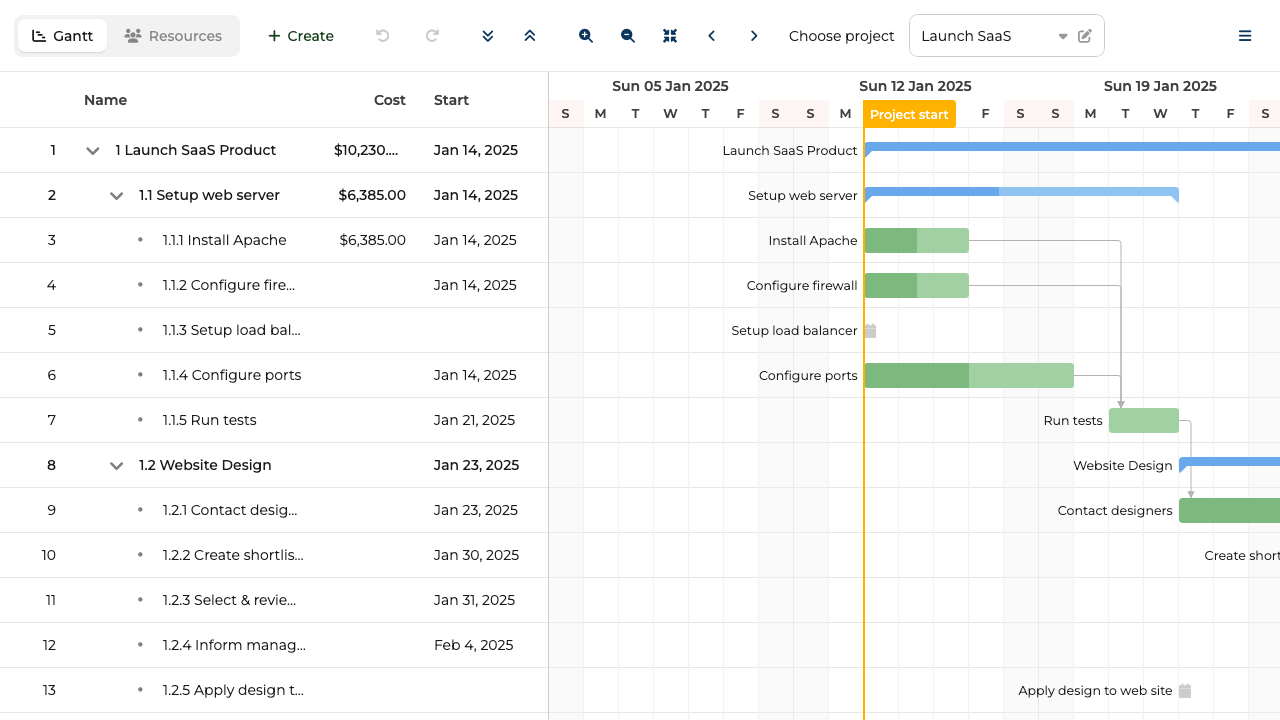
ChronoGraph scheduling engine: auto-scheduling, critical path, and client-side export
The ChronoGraph scheduling engine is the main differentiator. The following scheduling capabilities work together through the engine:
- Auto-scheduling
- Dependencies
- Constraints
- Project calendars
- Task calendars
- Resource calendars
ChronoGraph is open-source under the MIT license, so the reactive scheduling logic is auditable.
The export pipeline covers PDF, PNG, Excel, ICS, and MS Project XML without a server round-trip. Bryntum also imports MS Project and Primavera P6 files through MPXJ.
The theming system ships ten themes across five light/dark pairs.
Bryntum Gantt: bundle size, trial watermark, and config structure
The trial watermark persists during evaluation, which complicates early stakeholder demos. The API surface is large: project-level and Gantt-level configuration are separate objects with different responsibilities. The uncompressed bundle reaches 4 MB or more, which is a meaningful consideration for applications where initial load time is critical.
Bryntum Gantt pricing: perpetual license from $940 per developer
Per-developer licensing starts at $940. A three-person team pays $2,820 as an entry cost. OEM licensing for SaaS products requires a separate quote. All licenses are perpetual and include 12 months of updates.
TypeScript, framework wrappers, and the project-vs-inline-data rule
TypeScript type definitions ship with the package, covering the full Gantt and project API. Documentation at bryntum.com includes live code examples with an in-browser editor.
Framework wrappers for React (@bryntum/gantt-react), Angular, and Vue 3 are published on the same version cycle as the core.
One rule to encode early: never mix the project prop with inline data props (tasks, dependencies, resources). Using both throws at runtime. Pass all data through project, or use the inline props directly with no project key.
For runtime theme switching, load theme files with <link> tags marked for Bryntum theme detection and call DomHelper.setTheme().
Coding agent support: MCP server, Claude Code skill, and AI assistant
Bryntum ships two complementary AI tools: the MCP server exposes documentation retrieval, and the Claude Code skill adds judgment.
The MCP server (mcp.bryntum.com) exposes a search_bryntum_docs tool that returns version-specific documentation, source code examples, and configuration options for Gantt, Scheduler, Calendar, Grid, Task Board, and Scheduler Pro. The command to register it in Claude Code:
claude mcp add --transport http bryntum https://mcp.bryntum.com
The Claude Code skill guides agents through common mistakes: CSS import order, mixing project config with inline data props, and the correct dark mode pattern via DomHelper.setTheme(). An agent with both the MCP server and the skill produces working Bryntum code with fewer correction cycles.
Bryntum also ships an experimental AI chat panel that connects to Anthropic, OpenAI, or Google models. End users give natural language instructions such as "move all tasks assigned to Alex to next week" without touching the interface directly.
Use Bryntum Gantt when the component should own scheduling logic
Bryntum Gantt is the right call when scheduling correctness is a hard requirement: auto-scheduling, critical path analysis, resource calendars, and MS Project interop. The AI tooling, with both an MCP server and a dedicated Claude Code skill, gives it a meaningful edge for teams using AI coding agents.
ScheduleJS
ScheduleJS is a commercial Angular Gantt library developed by AISO SA (Switzerland). ScheduleJS is the JavaScript implementation of the FlexGanttFX feature set, with an API based on FlexGanttFX. The core rendering engine uses the HTML Canvas API rather than DOM elements, which avoids DOM-related bottlenecks when displaying large activity sets. ScheduleJS describes its viewport as supporting smooth scrolling with hundreds of thousands of rows.
ScheduleJS is best treated as a visualization and interaction framework for scheduling applications. Rows map to resources, activities map to task bars, layers group activities within a row, and ActivityLink objects can draw typed links between activities. Project scheduling logic such as critical path calculation, automatic rescheduling, and constraint enforcement belongs in the application layer.
Bryntum Gantt handles project management logic inside the library, while ScheduleJS gives Angular teams canvas rendering but leaves scheduling rules, export, and framework reach to the application.
Installing ScheduleJS
ScheduleJS is not on the public npm registry. It requires purchasing a license from AISO SA and downloading the package directly. After receiving the package, place it in a local_modules/ folder in the project root and install it as a local file reference:
yarn add file:./local_modules/schedule
A new Angular project provides the required shell. ScheduleJS' published manual lists Angular 11-era dependency versions; verify the supported Angular version with AISO before starting a new implementation.
ng new project-name --style=scss
The install adds all Angular dependencies automatically. The license key must be registered before any ScheduleJS component mounts.
The following shows a team sprint Gantt with four members across a one-week horizon. Setup spans three files: the Angular module, the component class, and the component template.
// app.module.ts
import { NgModule } from '@angular/core';
import { BrowserModule } from '@angular/platform-browser';
import { Locale as BaseLocaleEnUs } from '@js-joda/locale/dist/prebuilt/en-us';
import { LicenseManager, Locale, ScheduleModule } from 'schedule';
import { AppComponent } from './app.component';
import { SprintGanttComponent } from './sprint-gantt/sprint-gantt.component';

@NgModule({
  declarations : [AppComponent, SprintGanttComponent],
  imports      : [BrowserModule, ScheduleModule],
  bootstrap    : [AppComponent]
})
export class AppModule {
  constructor() {
    Locale.updateDefault(BaseLocaleEnUs.US);
    LicenseManager.setLicenseFromKey('your-license-key-here');
  }
}
// sprint-gantt.component.ts
import { Component, Injector } from '@angular/core';
import {
  AppTransactionalService,
  ChronoUnit,
  DefaultScheduleGanttComponentBase,
  GanttChart,
  Layer,
  MutableActivityBase,
  Row,
  TimeUtil
} from 'schedule';

class Task extends MutableActivityBase<{ name: string }> {
  constructor(name: string, startHours: number, durationHours: number) {
    const start = TimeUtil.now() + TimeUtil.ofHours(startHours);
    const end   = start + TimeUtil.ofHours(durationHours);
    super(name, start, end);
    this.setUserObject({ name });
  }
}

class TeamMember extends Row<undefined, undefined, Task> {}

@Component({
  selector    : 'app-sprint-gantt',
  templateUrl : './sprint-gantt.component.html',
  styleUrls   : ['./sprint-gantt.component.scss']
})
export class SprintGanttComponent
    extends DefaultScheduleGanttComponentBase<TeamMember> {

  gantt = new GanttChart<TeamMember>(undefined, this._injector);

  constructor(
    _appTransactionalService: AppTransactionalService,
    _injector: Injector
  ) {
    super(_appTransactionalService, _injector);
  }

  start(): void {
    const tasksLayer = new Layer('Tasks');
    this.gantt.getLayers().push(tasksLayer);

    const alice = new TeamMember('Alice (Frontend)');
    alice.addActivity(tasksLayer, new Task('UI Component Library', 0,  40));

    const bob = new TeamMember('Bob (Backend)');
    bob.addActivity(tasksLayer,   new Task('REST API Development', 0,  40));

    const carol = new TeamMember('Carol (Design)');
    carol.addActivity(tasksLayer, new Task('Wireframes v2',        0,  24));

    const dave = new TeamMember('Dave (QA)');
    dave.addActivity(tasksLayer,  new Task('Regression Suite',     0,  16));

    this.gantt.addRows(alice, bob, carol, dave);
    this.gantt.getTimeline().showTemporalUnit(ChronoUnit.DAYS, 200);
  }
}
<!-- sprint-gantt.component.html -->
<default-schedule-button-bar [gantt]="gantt"></default-schedule-button-bar>

<div class="timeline-container">
  <div class="timeline-filler"></div>
  <div class="timeline">
    <schedule-date-line  [gantt]="gantt"></schedule-date-line>
    <schedule-event-line [gantt]="gantt"></schedule-event-line>
  </div>
</div>

<default-schedule-gantt-graphic
  class="gantt-graphic"
  [gantt]="gantt"
  [ganttContainerElement]="nativeElement">
</default-schedule-gantt-graphic>
Four setup details require attention:
- The
LicenseManager.setLicenseFromKey()call must come before any ScheduleJS component mounts. - The package name is
schedule, notschedulejs. Import paths use'schedule'throughout. - Each resource is a
Rowsubclass. Each task bar is aMutableActivityBasesubclass. The library uses class extension rather than configuration objects. - Extend
DefaultScheduleGanttComponentBaseto wire up the Angular lifecycle rather than implementing the component from scratch.
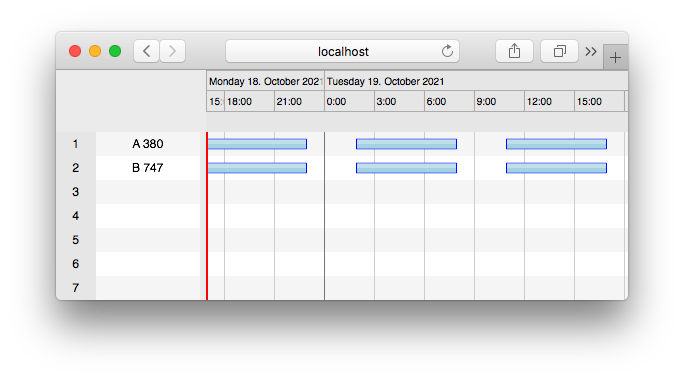
Canvas rendering at scale and FlexGanttFX migration path
Canvas rendering is the core differentiator. Because ScheduleJS draws directly to a canvas element, it avoids the DOM node overhead that accumulates at large row counts. The library handles hundreds of thousands of rows with smooth navigation.
Canvas provides pixel-level control, letting teams build fully custom activity renderers, row heights, and interaction layers without CSS specificity conflicts or DOM measurement overhead. Three layout types ship out of the box:
- Gantt layout (horizontal activity bars)
- Chart or histogram layout
- Agenda layout (calendar-style display)
Teams migrating from FlexGanttFX (the Java desktop predecessor) get a close API mapping, which reduces rewrite scope when moving to the web.
Angular-only, no auto-scheduling or export, and private package distribution
ScheduleJS is Angular-only. React and Vue applications require a custom wrapper or a different library.
The library provides ActivityLink visualization, but not a Bryntum-style automatic project scheduling engine. Applications need custom implementation for:
- Critical path calculation
- Automatic rescheduling
- Baselines
- Task splitting
- Undo/redo
- PDF or Excel export
The install process does not use a public registry. Every developer and CI/CD environment must receive the ScheduleJS package through a separate distribution step before running yarn add file:./local_modules/schedule. This adds friction at onboarding and in automated pipelines.
ScheduleJS pricing: from 1,500 EUR per developer, perpetual
AISO SA publishes pricing from 1,500 EUR for the ScheduleJS Enterprise perpetual license. The license includes one year of updates, support, and maintenance for one application and one developer. The ScheduleJS Viewer product starts at 500 EUR for one deployment and 100 users. Three license schemes are listed: internal use, OEM, and SaaS.
Class-extension data model: Row, MutableActivityBase, and Angular lifecycle
TypeScript definitions ship with the package. Documentation at schedulejs.com covers the developer manual and API reference.
The data model differs from DOM-based Gantt libraries. Resources are Row subclasses, activities are MutableActivityBase subclasses, and layers group activities within a row. Developers coming from property-based configuration libraries (such as Bryntum or DHTMLX) need time to adjust to the class-extension pattern.
The DefaultScheduleGanttComponentBase handles Angular lifecycle integration. Extending it is the recommended starting point for new components.
No AI tooling: local file install blocks standard npm agent workflows
ScheduleJS ships no MCP server, Claude Code skill, or structured documentation retrieval for AI agents.
The local file install is the main blocker for AI agents. An agent following the standard npm install pattern generates npm install schedulejs or npm install schedule, both of which fail because the package is not on the public registry. The class-extension data model diverges from the configuration-object patterns present in most Gantt library training data, so agents unfamiliar with ScheduleJS are likely to generate incorrect code for row and activity definitions.
Use ScheduleJS when Angular canvas rendering is the deciding constraint
ScheduleJS suits Angular teams that need canvas-level performance for very large datasets, pixel-level rendering control, or a migration path from a FlexGanttFX desktop application. It is the right call when the application provides its own scheduling logic and the DOM overhead of a traditional Gantt library is a demonstrated bottleneck.
Which is better: Bryntum Gantt or ScheduleJS?
For most production project management applications, Bryntum Gantt is the right choice. The following features are included by default:
- Auto-scheduling
- Critical path analysis
- Resource calendars
- MS Project import and export
- Client-side PDF, Excel, and PNG export
- Undo/redo
The trial package is on the public npm registry, and the MCP server and Claude Code skill make it easier to support in teams using AI coding agents.
Bryntum Gantt is the more complete default for project management applications, while ScheduleJS is the better fit only when canvas rendering performance at extreme scale is a hard requirement, the target framework is Angular, and the application implements its own scheduling logic. Teams migrating from FlexGanttFX get the closest API mapping available on the web, but the local file install and license-key workflow add overhead to evaluation and onboarding.