Best Vue scheduler components

This comparison covers five Vue resource scheduling libraries: Bryntum Scheduler, DHTMLX Scheduler, Syncfusion Schedule, DayPilot Scheduler, and Mobiscroll Event Calendar. A resource scheduler, also called a timeline scheduler, places resources on the Y-axis and a time axis on the X-axis, then renders event bars for each resource across that timeline. This is distinct from a Gantt chart, which models task dependencies and work breakdown structures, and from a calendar, which shows personal appointment views.
Vendor naming is inconsistent. Bryntum calls this product a Scheduler, Mobiscroll calls it an Event Calendar with a timeline view, and Syncfusion calls it Schedule. For a framework-agnostic comparison, see our article on the best JavaScript scheduler components.
Each section covers installation, a working Vue code sample, features, pricing, and trade-offs. Four of the five libraries ship a native Vue 3 wrapper. DHTMLX Scheduler is a global singleton that has no official Vue wrapper, so Vue integration requires initializing the library against a container element inside onMounted and cleaning up in onBeforeUnmount.
Bryntum Scheduler
Bryntum Scheduler is a commercial JavaScript resource scheduler that ships a first-party Vue 3 wrapper. It renders resources on rows and places event bars on a configurable time axis. The library includes 18 built-in view presets, virtual scrolling for large datasets, and an event editor out of the box. Bryntum Scheduler Pro extends the base product with a ChronoGraph scheduling engine that handles travel time between events and constraint-based scheduling.
Getting started with Bryntum Scheduler
Install the trial package and the Vue 3 wrapper:
npm install @bryntum/scheduler@npm:@bryntum/scheduler-trial@7.3.0
npm install @bryntum/scheduler-vue-3@7.3.0
Import the required stylesheets in main.js or App.vue. CSS load order matters here: the FontAwesome base stylesheet must come before the solid icons stylesheet, and the theme file must come last.
import '@bryntum/scheduler/fontawesome/css/fontawesome.css';
import '@bryntum/scheduler/fontawesome/css/solid.css';
import '@bryntum/scheduler/scheduler.css';
import '@bryntum/scheduler/svalbard-light.css';
Define the scheduler configuration in a reactive ref and bind it with v-bind to the <bryntum-scheduler> component:
<template>
    <bryntum-scheduler v-bind="schedulerConfig" />
</template>

<script setup>
import { ref } from 'vue';
import { BryntumScheduler } from '@bryntum/scheduler-vue-3';

const schedulerConfig = ref({
    startDate  : '2025-05-07',
    endDate    : '2025-05-26',
    viewPreset : 'hourAndDay',
    columns    : [{ text : 'Name', field : 'name', width : 130 }],
    resources  : [
      { id : 1,  name : 'Celia',          title : 'Sales' },
      { id : 11, name : 'Fancy law firm', eventColor : 'teal' },
      { id : 12, name : 'Small boutique', eventColor : 'blue' },
      { id : 13, name : 'Grocery store',  eventColor : 'lime' }
    ],
    events     : [
      { id : 1, resourceId : 1,  name : 'Busy',              startDate : '2025-05-07', endDate : '2025-05-09', eventColor : 'red' },
      { id : 2, resourceId : 11, name : 'Meeting',           startDate : '2025-05-07', endDate : '2025-05-09', location : 'clients office' },
      { id : 3, resourceId : 12, name : 'Phone',             startDate : '2025-05-07', endDate : '2025-05-08', location : 'office' },
      { id : 4, resourceId : 13, name : 'Suggested meeting', startDate : '2025-05-09', endDate : '2025-05-11', location : 'grocery store' }
    ]
});
</script>
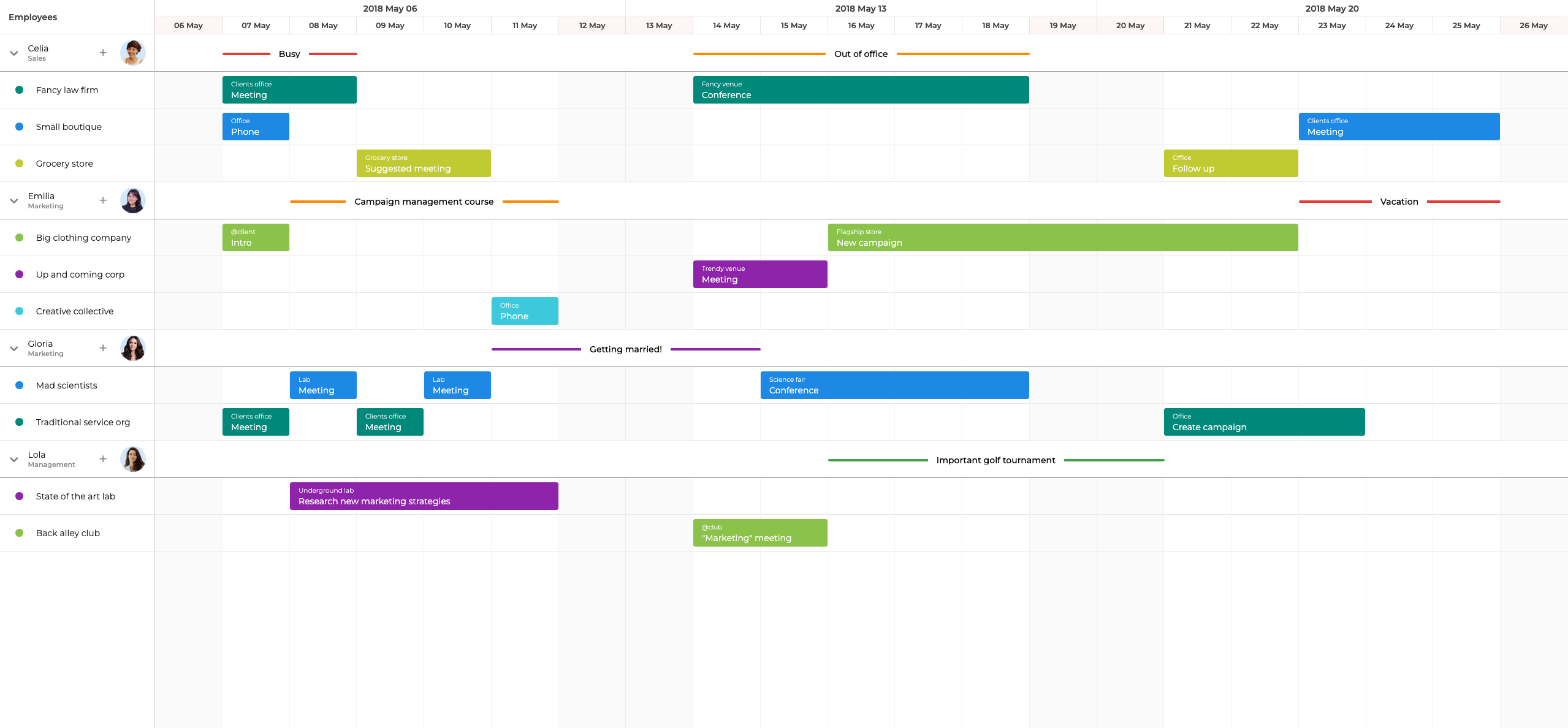
Bryntum Scheduler features
Bryntum Scheduler supports multi-resource event assignments, event overlap detection, drag-and-drop resize, a built-in event editor, recurring events, resource grouping in both vertical and horizontal orientations, and virtual scrolling. It ships 18 view presets covering time scales from minutes to years, and 10 built-in themes. Bryntum also provides an MCP server and a Claude Code skill so AI coding assistants can reference the API documentation directly during development. Scheduler Pro adds travel time between events and the ChronoGraph reactive scheduling engine.
Bryntum Scheduler pricing
The small-team license costs $680 per developer as a perpetual license, with a three-developer minimum and 12 months of updates. After the update period, you retain the last version received. A trial is available via npm using the install command above.
Pros of Bryntum Scheduler
- Native Vue 3 wrapper with full TypeScript type definitions.
- 18 built-in view presets cover most time scales without custom configuration.
- Virtual scrolling maintains performance with large resource and event sets.
- MCP server and Claude Code skill support AI-assisted development workflows.
- All features are included in the base license without paid add-ons.
Cons of Bryntum Scheduler
- No free tier beyond the npm trial.
- Per-developer pricing is higher than some alternatives in this list.
DHTMLX Scheduler
DHTMLX Scheduler is a mature JavaScript calendar and scheduling library. It supports multiple calendar views and adds a Timeline view for resource scheduling. DHTMLX does not ship an official Vue wrapper, so Vue integration requires initializing the library against a DOM element inside onMounted and cleaning up in onBeforeUnmount. The library is also a global singleton, which means running multiple scheduler instances on the same page requires careful management.
Getting started with DHTMLX Scheduler
Install the package from npm:
npm install dhtmlx-scheduler
Create a Vue component that initializes the DHTMLX Scheduler Timeline view against a container element using a template ref:
<template>
    <div ref="containerRef" style="width: 100%; height: 100vh;" />
</template>

<script setup>
import { ref, onMounted, onBeforeUnmount } from 'vue';
import 'dhtmlx-scheduler/codebase/dhtmlxscheduler_material.css';
import scheduler from 'dhtmlx-scheduler';

const containerRef = ref(null);

onMounted(() => {
    scheduler.config.xml_date = '%Y-%m-%d %H:%i';
    scheduler.createTimelineView({
        name       : 'timeline',
        x_unit     : 'hour',
        x_date     : '%H:%i',
        x_step     : 1,
        x_size     : 8,
        x_start    : 8,
        x_length   : 8,
        y_unit     : scheduler.serverList('people'),
        y_property : 'section_id',
        render     : 'bar'
    });
    scheduler.init(containerRef.value, new Date(2026, 0, 2), 'timeline');
    scheduler.serverList('people', [
        { key : '1', label : 'Alice' },
        { key : '2', label : 'Bob' }
    ]);
    scheduler.parse([
        { id : 1, text : 'Meeting', start_date : '2026-01-02 10:00', end_date : '2026-01-02 12:00', section_id : '1' },
        { id : 2, text : 'Workshop', start_date : '2026-01-04 09:00', end_date : '2026-01-04 17:00', section_id : '2' }
    ]);
});

onBeforeUnmount(() => {
    scheduler.destructor();
});
</script>
The Timeline view for resource scheduling requires the DHTMLX Scheduler PRO edition. The Standard edition does not include it.
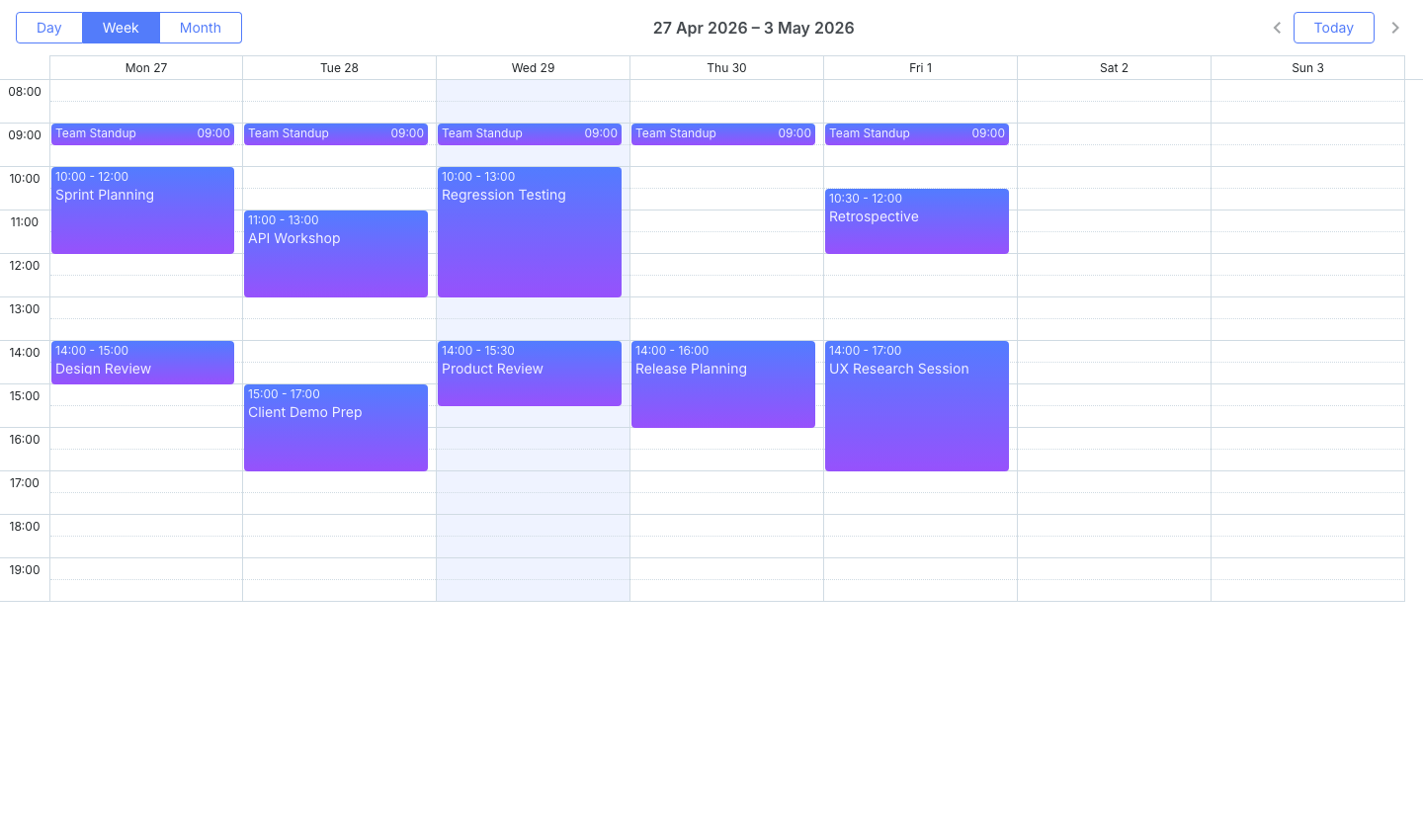
DHTMLX Scheduler features
DHTMLX Scheduler provides multiple calendar views (day, week, month, agenda), a Timeline view for resource scheduling (Pro), recurring events, and touch support. Because scheduler is a global singleton, you must call scheduler.destructor() on component unmount to avoid memory leaks and state conflicts.
DHTMLX Scheduler pricing
The Standard edition is free under the GPL license for open-source projects. Commercial PRO licenses are perpetual and range from $599 for an individual license to $3,999 for an enterprise license.
Pros of DHTMLX Scheduler
- GPL Standard edition is free for open-source projects.
- Package is available on the public npm registry without authentication.
- Published pricing tiers make budgeting straightforward.
Cons of DHTMLX Scheduler
- No official Vue wrapper: DOM initialization and teardown must be handled manually with lifecycle hooks.
- The Timeline view for resource scheduling requires the PRO edition.
- The global singleton pattern complicates multiple-instance scenarios.
Syncfusion Schedule
Syncfusion Schedule ships as a first-party Vue component through the @syncfusion/ej2-vue-schedule package. Timeline Day, Timeline Week, and Timeline Month views provide the resource scheduling layout. The component is available under a Community License for qualifying organizations.
Getting started with Syncfusion Schedule
Install the package:
npm install @syncfusion/ej2-vue-schedule
Register the Syncfusion license key in main.js before any component mounts. Calling registerLicense after component initialization causes rendering errors.
import { registerLicense } from '@syncfusion/ej2-base';
registerLicense('YOUR_LICENSE_KEY');
Syncfusion requires multiple stylesheet imports. Add all of the following to main.js:
import '@syncfusion/ej2-base/styles/material.css';
import '@syncfusion/ej2-buttons/styles/material.css';
import '@syncfusion/ej2-calendars/styles/material.css';
import '@syncfusion/ej2-dropdowns/styles/material.css';
import '@syncfusion/ej2-inputs/styles/material.css';
import '@syncfusion/ej2-navigations/styles/material.css';
import '@syncfusion/ej2-popups/styles/material.css';
import '@syncfusion/ej2-vue-schedule/styles/material.css';
Define the resource data and event data in a Vue component using the Syncfusion directive components:
<template>
    <ejs-schedule height="550px" :selected-date="selectedDate" :event-settings="eventSettings">
        <e-resources>
            <e-resource field="ResourceId" title="Resource" name="Resources"
                :data-source="resourceData" text-field="text" id-field="id" />
        </e-resources>
        <e-views>
            <e-view option="TimelineDay" />
            <e-view option="TimelineWeek" />
        </e-views>
    </ejs-schedule>
</template>

<script setup>
import { ref } from 'vue';
import { ScheduleComponent as EjsSchedule, ResourcesDirective as EResources, ResourceDirective as EResource, ViewsDirective as EViews, ViewDirective as EView, TimelineViewsService } from '@syncfusion/ej2-vue-schedule';

const selectedDate = ref(new Date(2026, 0, 2));
const resourceData = ref([
    { text : 'Alice', id : 1 },
    { text : 'Bob', id : 2 }
]);
const eventSettings = ref({
    dataSource : [
        { Id : 1, Subject : 'Meeting', StartTime : new Date(2026, 0, 2, 10), EndTime : new Date(2026, 0, 2, 12), ResourceId : 1 },
        { Id : 2, Subject : 'Workshop', StartTime : new Date(2026, 0, 4, 9), EndTime : new Date(2026, 0, 4, 17), ResourceId : 2 }
    ]
});

provide('schedule', [TimelineViewsService]);
</script>
Syncfusion Schedule features
Syncfusion Schedule includes Timeline Day, Timeline Week, and Timeline Month views, drag-and-drop event editing, recurring events, resource grouping, virtual scrolling, and export. The standard calendar views (Day, Week, Month) are also available alongside the timeline views.
Syncfusion Schedule pricing
The Community License is free for organizations with annual gross revenue under $1 million and five or fewer developers. Commercial licensing is quote-based and not publicly listed.
Pros of Syncfusion Schedule
- Native Vue component with first-party support.
- Community License covers all features at no cost for qualifying teams.
- Multiple timeline views (day, week, month) are included in the base package.
Cons of Syncfusion Schedule
- Setup requires importing eight separate CSS files from different packages.
- Commercial pricing requires contacting Syncfusion for a quote.
- The license registration call must appear in
main.jsbefore any component renders.
DayPilot Scheduler
DayPilot Pro provides a Vue scheduler component through the daypilot-pro-vue package. It renders resource rows on the Y-axis and a configurable time axis on the X-axis, with drag-and-drop event editing and a hierarchical resource tree. A DayPilot Lite version with limited features is freely available.
Getting started with DayPilot Scheduler
Install the package (distributed after purchasing a license):
npm install daypilot-pro-vue
Define the scheduler configuration in a reactive object and pass it to the <daypilot-scheduler> component:
<template>
    <daypilot-scheduler :config="config" />
</template>

<script setup>
import { reactive } from 'vue';
import { DayPilotScheduler as DaypilotScheduler } from 'daypilot-pro-vue';

const config = reactive({
    startDate  : '2026-01-01',
    days       : 7,
    scale      : 'Hour',
    cellWidth  : 40,
    resources  : [
        { name : 'Alice', id : 'R1' },
        { name : 'Bob',   id : 'R2' }
    ],
    events     : [
        { id : 1, text : 'Meeting', start : '2026-01-02T10:00:00', end : '2026-01-02T12:00:00', resource : 'R1' },
        { id : 2, text : 'Workshop', start : '2026-01-04T09:00:00', end : '2026-01-04T17:00:00', resource : 'R2' }
    ]
});
</script>
DayPilot Scheduler features
DayPilot Scheduler supports resource rows, drag-and-drop event editing, a hierarchical resource tree, multi-day events, and event customization callbacks. It does not include a scheduling engine, so event dates do not recalculate automatically when dependencies change. A UI Builder lets you configure the component visually and export the resulting configuration code.
DayPilot Scheduler pricing
DayPilot Pro starts at $899 per developer as a perpetual license. A Lite version with limited features is free.
Pros of DayPilot Scheduler
- Native Vue component.
- Hierarchical resource tree is included without additional configuration.
- Lite version provides a free entry point for simple use cases.
- UI Builder reduces configuration time for common layouts.
Cons of DayPilot Scheduler
- No scheduling engine: dependent event dates must be managed in application code.
- Package is not on the public npm registry.
- Feature set is narrower than Bryntum Scheduler or Syncfusion Schedule.
Mobiscroll Event Calendar
Mobiscroll Event Calendar is a commercial component suite that includes a timeline view for resource scheduling. Mobiscroll uses the "Event Calendar" name for what other vendors call a scheduler. The library is built with a mobile-first approach and is optimized for touch interaction and responsive layouts across desktop and mobile.
Getting started with Mobiscroll Event Calendar
Install the package:
npm install @mobiscroll/vue
Define resources, events, and the view configuration in a Vue component using the <mbsc-eventcalendar> component:
<template>
    <mbsc-eventcalendar :data="myEvents" :resources="myResources" :view="myView" />
</template>

<script setup>
import { ref } from 'vue';
import { MbscEventcalendar } from '@mobiscroll/vue';
import '@mobiscroll/vue/dist/css/mobiscroll.min.css';

const myResources = ref([
    { id : 1, name : 'Alice' },
    { id : 2, name : 'Bob' }
]);
const myEvents = ref([
    { id : 1, resource : 1, title : 'Meeting', start : '2026-01-02T10:00:00', end : '2026-01-02T12:00:00' },
    { id : 2, resource : 2, title : 'Workshop', start : '2026-01-04T09:00:00', end : '2026-01-04T17:00:00' }
]);
const myView = { timeline : { type : 'week', eventList : false } };
</script>
Mobiscroll Event Calendar features
Mobiscroll Event Calendar includes a timeline view, drag-and-drop event editing, recurring events, and responsive layouts. The library is mobile-first: it handles touch gestures and adapts the layout for small screens without additional configuration. Among the five options in this article, Mobiscroll provides the best out-of-the-box mobile experience.
Mobiscroll Event Calendar pricing
Mobiscroll Event Calendar starts at $995 per internal project as a perpetual license. A trial is available on the Mobiscroll website.
Pros of Mobiscroll Event Calendar
- Native Vue component.
- Best mobile and touch experience among the five options compared here.
- Single CSS import keeps the setup straightforward.
- Responsive layout adapts to different screen sizes without custom work.
Cons of Mobiscroll Event Calendar
- SaaS and multi-customer product pricing requires a custom quote.
- Narrower feature set for resource scheduling compared to Bryntum Scheduler.
- No free tier beyond the trial.
Conclusion
The table below summarizes the key capabilities across all five libraries.
| Feature | Bryntum Scheduler | DHTMLX Scheduler | Syncfusion Schedule | DayPilot Scheduler | Mobiscroll Event Calendar |
|---|---|---|---|---|---|
| Resource grouping | Yes | Yes (Pro) | Yes | Yes | Yes |
| Multi-level resources | Yes | Yes (Pro) | Yes | Yes (tree) | Yes |
| Drag-and-drop | Yes | Yes | Yes | Yes | Yes |
| Recurring events | Yes | Yes | Yes | Yes | Yes |
| Virtual scrolling | Yes | No | Yes | No | No |
| Vue 3 native wrapper | Yes | No (container approach) | Yes | Yes | Yes |
| Free tier | Trial only | GPL Standard | Community License | Lite version | Trial only |
The table below maps common project requirements to the library best suited for each.
| Use case | Recommended library |
|---|---|
| Enterprise Vue app requiring full resource scheduling | Bryntum Scheduler |
| Full-featured scheduler with a free Community License | Syncfusion Schedule |
| Mobile or touch-first scheduling interface | Mobiscroll Event Calendar |
| Open-source project or GPL-licensed application | DHTMLX Scheduler Standard |
For most Vue teams building a resource scheduling UI, Bryntum Scheduler and Syncfusion Schedule are the strongest choices. Both ship native Vue 3 wrappers and include virtual scrolling, resource grouping, and recurring events. Bryntum Scheduler adds an MCP server and Claude Code skill that make it well suited to teams using AI coding assistants during development. The Syncfusion Community License makes it the practical choice for smaller teams that qualify under the revenue and headcount thresholds.
DHTMLX Scheduler is the best option when the project is open-source and the GPL license fits. The lack of an official Vue wrapper is a real integration cost, but the Timeline view covers the resource scheduling use case once you are on the PRO edition. DayPilot Scheduler suits teams that need a native Vue component with a hierarchical resource tree and can accept the absence of a scheduling engine. Mobiscroll Event Calendar is the right choice when mobile and touch support are primary requirements: no other library in this comparison matches its responsive behavior and touch gesture handling out of the box.