Best JavaScript Gantt chart components for enterprise project management

Enterprise project management tools place demands on a Gantt chart component that go well beyond basic bar rendering. Teams need an auto-scheduling engine that propagates changes through task dependencies automatically, critical path visualization to identify schedule risk, resource management to track assignments and capacity, client-side export to PDF or Excel for reporting, and structured data-loading helpers that simplify backend integration. Framework wrappers for React, Angular, and Vue matter too, because most enterprise frontends are built on one of those three. We evaluated five components against those criteria: Bryntum Gantt, DHTMLX Gantt, Syncfusion Gantt, DayPilot Gantt, and Netronic VSW SE.
In this comparison, an enterprise Gantt component ships a scheduling engine rather than drag-and-drop positioning alone. It also includes built-in critical path calculation, resource assignment and histogram views, client-side document export, and framework support for mature engineering organizations. Each section covers installation, a working code example, the enterprise features available, pricing, and trade-offs.
Bryntum Gantt
Bryntum Gantt is a commercial JavaScript component built around the ChronoGraph reactive scheduling engine, which Bryntum open-sources under the MIT license. The engine performs forward- and backward-scheduling automatically whenever task data changes, giving it the broadest scheduling implementation among the components we compared.
Getting started with Bryntum Gantt
Bryntum publishes trial packages to the public npm registry. Install the trial with:
npm install @bryntum/gantt@npm:@bryntum/gantt-trial@7.3.0
Add a container element and prevent margin collapse on the root:
<style>
  html, body { margin: 0; height: 100%; }
  #container { height: 100vh; }
</style>
<div id="container"></div>
CSS imports must arrive in this order. The theme file last overrides any defaults:
import '@bryntum/gantt/fontawesome/css/fontawesome.css';
import '@bryntum/gantt/fontawesome/css/solid.css';
import '@bryntum/gantt/gantt.css';
import '@bryntum/gantt/svalbard-light.css';
import { Gantt } from '@bryntum/gantt';

new Gantt({
    appendTo : 'container',
    columns  : [
        { type : 'name',        width : 250 },
        { type : 'duration',    width : 80  },
        { type : 'percentdone', width : 60  }
    ],
    project : {
      startDate : '2025-01-14',
      tasks : [
          {
              id : 1000, name : 'Launch SaaS Product', expanded : true, percentDone : 35.7,
              children : [
                  { id : 11, name : 'Install Apache',      startDate : '2025-01-14', duration : 3, percentDone : 50 },
                  { id : 12, name : 'Configure firewall', startDate : '2025-01-14', duration : 3, percentDone : 50 },
                  { id : 15, name : 'Run tests',          startDate : '2025-01-21', duration : 2, percentDone : 0 }
              ]
          }
      ],
      dependencies : [
          { fromTask : 11, toTask : 15, lag : 2 },
          { fromTask : 12, toTask : 15 }
      ]
    }
});
Keep all data inside the project property. Never mix the project prop with top-level inline data props such as tasks or dependencies, because that pattern causes the project model to ignore the inline data.
For production backends, replace the inline task data with CrudManager URLs:
project : {
    loadUrl  : '/api/load',
    syncUrl  : '/api/sync',
    autoLoad : true,
    autoSync : true
}
The CrudManager sends a single HTTP request that loads tasks, dependencies, resources, and assignments in one round trip, and batches writes back in the same structure.
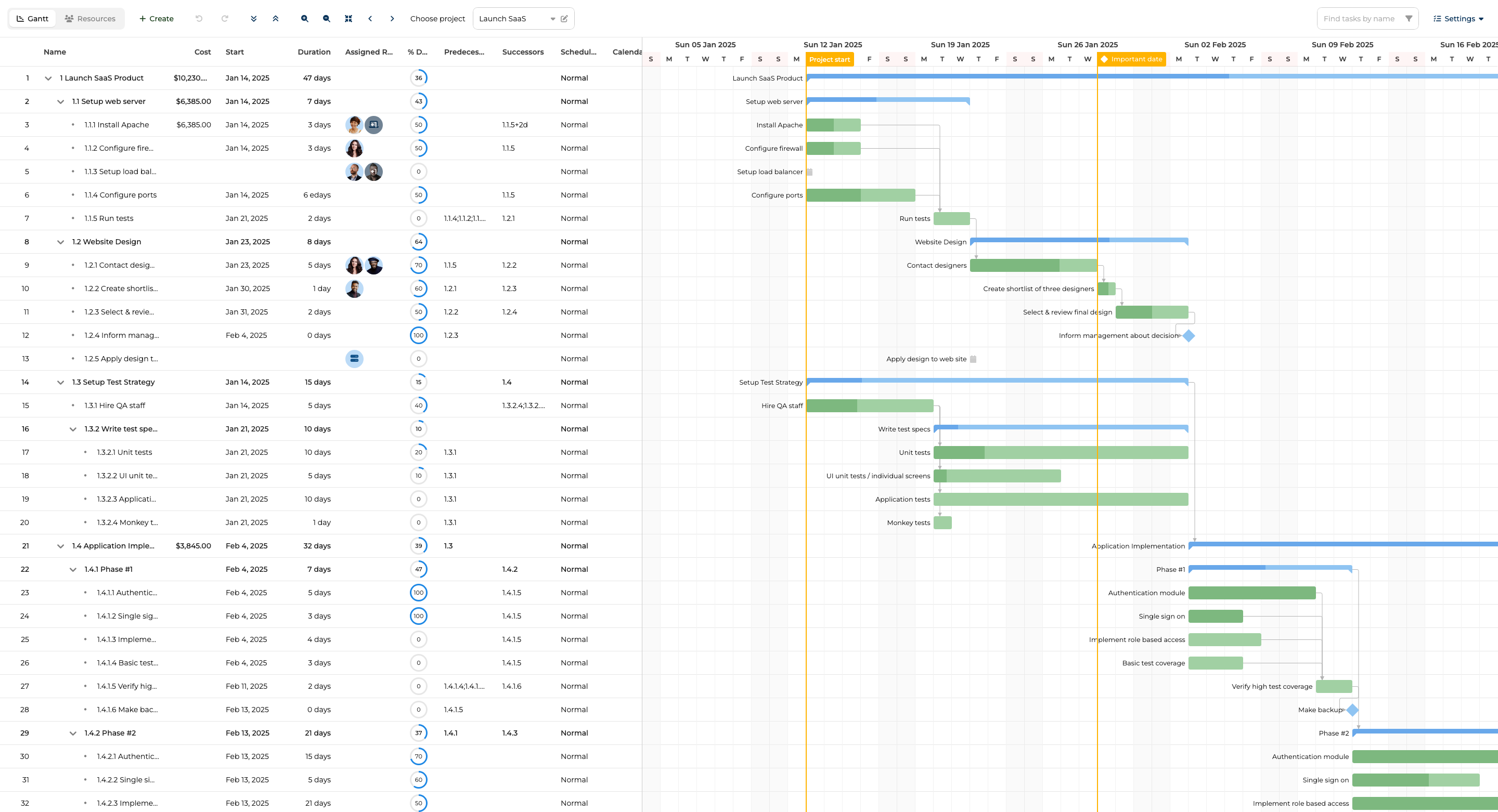
Bryntum Gantt features
Bryntum Gantt covers the full enterprise feature set:
- Auto-scheduling via ChronoGraph with constraint support (start-no-earlier-than, finish-no-later-than, must-start-on, and so on)
- Critical path visualization with color-coded highlighting
- Resource management with assignment editing and resource histogram views
- Baselines and variance tracking against saved snapshots
- Split tasks and per-task work calendars
- Undo/redo with configurable history depth
- Client-side export to PDF, PNG, Excel, ICS, and MS Project XML
- MS Project and Primavera P6 import via MPXJ
- 45 built-in locales and RTL layout support
- React, Angular, Vue, and Salesforce LWC wrappers
- MCP server at
mcp.bryntum.comfor AI-assisted development - A Claude Code skill that catches common setup mistakes automatically
The MCP server and Claude Code skill are useful during development because Bryntum's API surface is large. Having accurate, queryable documentation in the AI context reduces the time spent resolving import order issues, scheduling engine configuration errors, and CrudManager payload mismatches.
Bryntum Gantt pricing
Bryntum Gantt costs $940 per developer with a perpetual license that includes 12 months of updates. OEM and SaaS distribution require a separate quote. A trial is available at https://bryntum.com/download/?product=gantt.
Pros of Bryntum Gantt
- Most complete scheduling engine of the five components, open-sourced as ChronoGraph
- Full enterprise feature set in one package: baselines, split tasks, resource histograms, client-side export
- Broadest export format coverage including MS Project XML and Primavera P6 import
- MCP server and Claude Code skill reduce AI-assisted development friction
- 45 built-in locales and RTL support for global deployments
Cons of Bryntum Gantt
- Commercial license required for production use, and per-developer pricing adds up on large teams
- Large API surface has a noticeable learning curve
- OEM/SaaS pricing is not published and requires a quote
DHTMLX Gantt
DHTMLX Gantt is one of the older JavaScript Gantt libraries still actively maintained. It ships a Standard tier under the GPL license, making it a viable option for open-source projects. Enterprise features are gated behind the Pro upgrade at higher license tiers.
Getting started with DHTMLX Gantt
DHTMLX Gantt is on the public npm registry:
npm install dhtmlx-gantt@9.1.4
The library exposes a global gantt singleton. Multiple simultaneous instances require the Commercial license:
import { gantt } from 'dhtmlx-gantt';
import 'dhtmlx-gantt/codebase/dhtmlxgantt.css';

gantt.config.date_format = '%Y-%m-%d';

gantt.ext.zoom.init({
    levels : [
        { name : 'month', scale_height : 50, min_column_width : 120,
          scales : [{ unit : 'month', format : '%F %Y' }] },
        { name : 'week',  scale_height : 50, min_column_width : 60,
          scales : [{ unit : 'month', format : '%F %Y' }, { unit : 'week', format : 'W%W' }] }
    ]
});
gantt.ext.zoom.setLevel('week');

gantt.init('container');

gantt.parse({
    data  : [
        { id : 1, text : 'Phase 1',      start_date : '2026-01-01', duration : 14, open : true },
        { id : 2, text : 'Requirements', start_date : '2026-01-01', duration : 5,  parent : 1  },
        { id : 3, text : 'Design',       start_date : '2026-01-08', duration : 8,  parent : 1  }
    ],
    links : [{ id : 1, source : 2, target : 3, type : '0' }]
});
The singleton architecture means a second call to gantt.init() on a different element reinitializes the same instance rather than creating an independent chart.
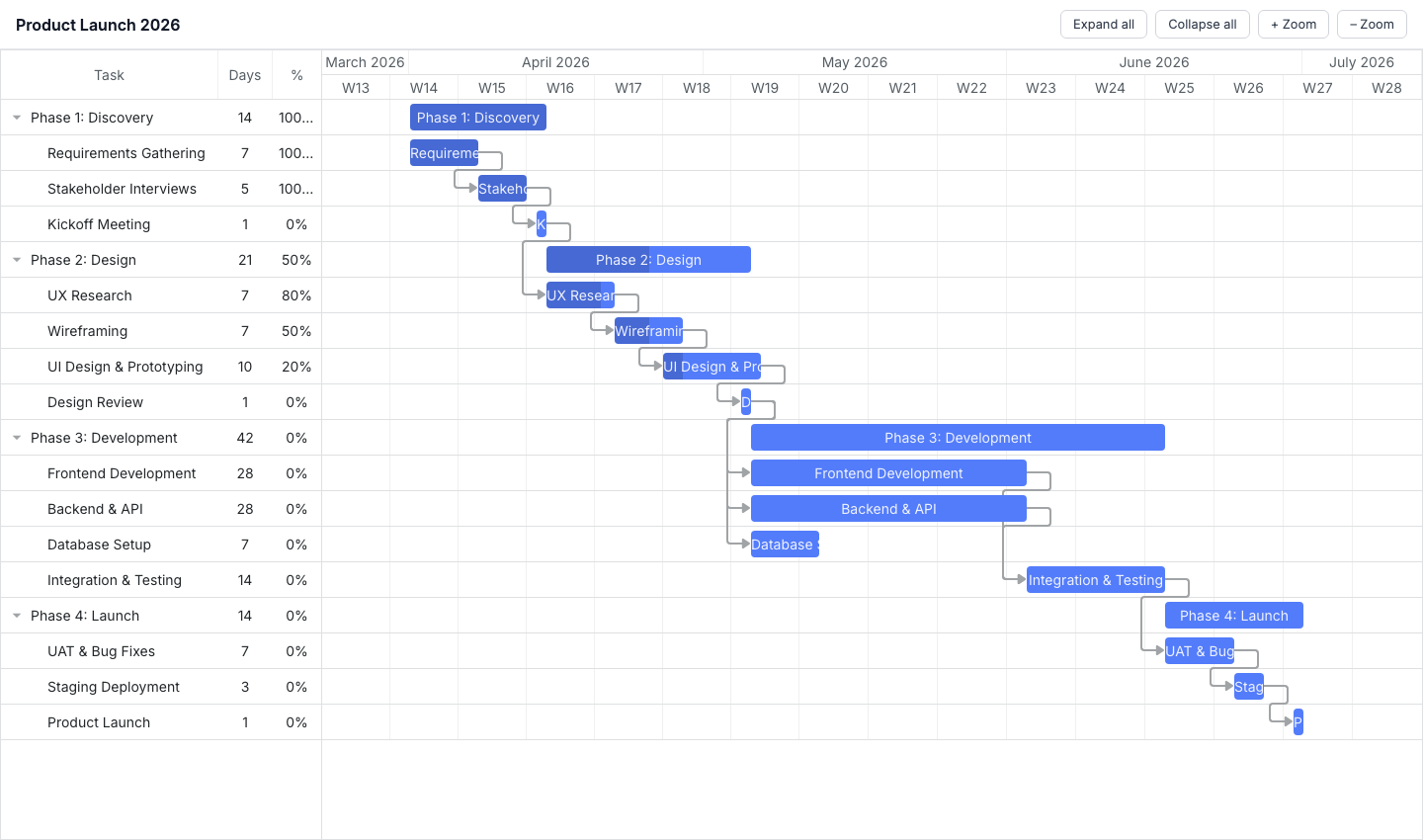
DHTMLX Gantt features
The Standard tier covers basic Gantt rendering, dependency links, drag-and-drop, and inline editing. Auto-scheduling, critical path visualization, resource management, baselines, and split tasks are all restricted to the Pro upgrade, which starts at the Individual tier ($699). Online export (PDF and PNG) works by sending chart data to a DHTMLX-hosted export service. A local export add-on that avoids the external service costs $350 on top of the Individual license.
DHTMLX also provides an HTTP MCP server that exposes the Gantt documentation for AI-assisted development.
DHTMLX Gantt pricing
Licensing is perpetual across all tiers. GPL Standard is free. Individual costs $699, Commercial $1,399, Enterprise $2,999, and Ultimate $5,999.
Pros of DHTMLX Gantt
- GPL Standard tier is free and includes basic Gantt functionality
- Published, transparent pricing across all tiers
- Public npm package with no access restrictions
- HTTP MCP server available for AI-assisted development
Cons of DHTMLX Gantt
- Auto-scheduling, critical path, resource management, and baselines all require the Pro upgrade
- Default PDF/PNG export sends data to an external DHTMLX-hosted service, and local export requires a $350 add-on
- Global singleton makes running multiple independent chart instances on one page awkward
Syncfusion Gantt
Syncfusion EJ2 Gantt is part of the Syncfusion Essential JS 2 component suite. It uses a module injection pattern where features are opt-in: only the capabilities you explicitly inject are bundled into your application. The Community License covers all features at no cost for teams that qualify.
Getting started with Syncfusion Gantt
Install the package from npm:
npm install @syncfusion/ej2-gantt@33.2.4
Syncfusion requires a license key registered at startup, and each feature module must be injected before instantiation:
import { registerLicense } from '@syncfusion/ej2-base';
import { Gantt, Edit, Selection, Toolbar, CriticalPath, Filter, Sort, UndoRedo } from '@syncfusion/ej2-gantt';
import '@syncfusion/ej2-base/styles/material.css';
import '@syncfusion/ej2-buttons/styles/material.css';
import '@syncfusion/ej2-calendars/styles/material.css';
import '@syncfusion/ej2-dropdowns/styles/material.css';
import '@syncfusion/ej2-inputs/styles/material.css';
import '@syncfusion/ej2-navigations/styles/material.css';
import '@syncfusion/ej2-popups/styles/material.css';
import '@syncfusion/ej2-richtexteditor/styles/material.css';
import '@syncfusion/ej2-treegrid/styles/material.css';
import '@syncfusion/ej2-grids/styles/material.css';
import '@syncfusion/ej2-gantt/styles/material.css';

registerLicense('your-license-key-here');

Gantt.Inject(Edit, Selection, Toolbar, CriticalPath, Filter, Sort, UndoRedo);

const data = [
    {
        TaskID : 1, TaskName : 'Phase 1',
        subtasks : [
            { TaskID : 2, TaskName : 'Requirements', StartDate : new Date('2026-01-01'), Duration : 5, Progress : 100 },
            { TaskID : 3, TaskName : 'Design',       StartDate : new Date('2026-01-08'), Duration : 8, Progress : 20, Predecessor : '2' }
        ]
    }
];

new Gantt({
    dataSource : data,
    height     : '100%',
    taskFields : {
        id         : 'TaskID',
        name       : 'TaskName',
        startDate  : 'StartDate',
        duration   : 'Duration',
        progress   : 'Progress',
        dependency : 'Predecessor',
        child      : 'subtasks'
    },
    columns : [
        { field : 'TaskName', headerText : 'Task',     width : 250 },
        { field : 'Duration', headerText : 'Duration', width : 80  },
        { field : 'Progress', headerText : '%',        width : 60  }
    ],
    enableCriticalPath : true,
    allowFiltering     : true,
    allowSorting       : true,
    undoRedoActions    : ['Add', 'Edit', 'Delete', 'TaskbarEditing', 'Indent', 'Outdent', 'ColumnResize', 'Sorting', 'Filtering']
}).appendTo('#container');
The number of CSS imports is significant: 11 files covering base components, peer dependencies, and the Gantt component itself. A bundler like Vite or webpack will tree-shake the JavaScript modules based on what you inject, but all the CSS must be imported explicitly.
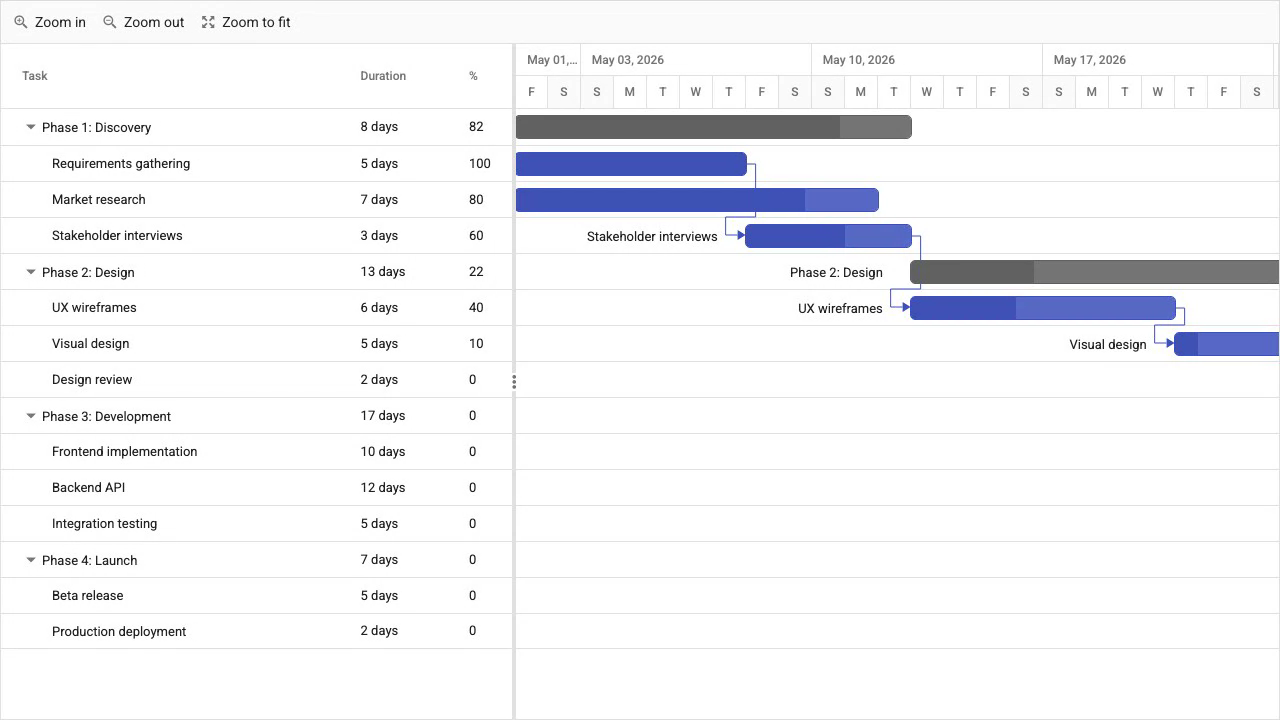
Syncfusion Gantt features
Syncfusion Gantt includes auto-scheduling, critical path visualization (injected via the CriticalPath module), baselines, split tasks, resource management with resource allocation views, undo/redo with a configurable action list, and export to PDF, Excel, and CSV. All of these are available under both the Community License and the commercial license.
Syncfusion provides React, Angular, Vue, Blazor, and other framework wrappers through the broader EJ2 suite.
Syncfusion Gantt pricing
The Community License is free and covers all enterprise features. Eligibility requires annual revenue under $1 million, five or fewer developers, and 10 or fewer total employees. Teams that exceed any of those thresholds require a commercial license, for which pricing is quote-based.
Pros of Syncfusion Gantt
- Community License provides every enterprise feature at no cost for qualifying teams
- Client-side export to PDF, Excel, and CSV included
- Large suite of framework wrappers covering React, Angular, Vue, and Blazor
Cons of Syncfusion Gantt
Gantt.Inject()must be called for every feature module before instantiation, adding boilerplate- 11 CSS imports are required, and missing any causes broken styling
- MCP servers are stdio-only, which is less convenient for remote or containerized development environments
- Commercial pricing is not published
DayPilot Gantt
DayPilot Pro is a scheduling component suite primarily oriented toward calendar and scheduling views. Its Gantt component provides dependency links, drag-and-drop task editing, task completion tracking, and a graphical UI Builder for configuration. It does not include an auto-scheduling engine or built-in resource management.
Getting started with DayPilot Gantt
DayPilot Pro is not on the public npm registry. After purchasing a license, you download the package from the DayPilot customer portal and reference it locally or from your own package feed. A 60-day trial is available on the DayPilot website.
import { DayPilot } from 'daypilot-pro';

const gantt = new DayPilot.Gantt('container', {
    startDate : '2026-01-01',
    days      : 30,
    tasks     : [
        { id : '1', start : '2026-01-01', end : '2026-01-15', text : 'Phase 1', completion : 50 },
        { id : '2', start : '2026-01-08', end : '2026-01-20', text : 'Design',  completion : 20 }
    ],
    links : [{ from : '1', to : '2' }]
});
gantt.init();
The API follows a simple imperative initialization pattern. Task positions are date-range driven rather than duration-and-dependency driven, which reflects the absence of a scheduling engine.
DayPilot Gantt features
DayPilot Gantt covers dependency rendering, drag-and-drop task editing, task completion bars, time scale configuration, and a UI Builder tool for generating configuration code visually. React, Angular, and Vue wrappers are available.
Auto-scheduling and resource management are not part of the DayPilot Gantt component. Tasks must be positioned manually by setting explicit start and end dates. Teams that need the scheduler to compute task dates from dependency chains and constraints will need to implement that logic themselves or choose a different component.
DayPilot Gantt pricing
Licensing starts at $649 per developer, perpetual, with either six or 12 months of maintenance included depending on the tier. A 60-day trial is available.
Pros of DayPilot Gantt
- UI Builder accelerates initial configuration
- React, Angular, and Vue wrappers included
- 60-day trial period
Cons of DayPilot Gantt
- No auto-scheduling engine, so task dates must be managed manually
- No built-in resource management in the Gantt component
- Not on the public npm registry, so download requires the customer portal
Netronic VSW SE
Netronic Visual Scheduling Widget SE (VSW SE) is a canvas-based scheduling component built by Netronic GmbH. Because it renders to a canvas element rather than the DOM, it handles very large activity counts without the layout recalculation overhead that affects DOM-based components. Version 9.0 added ESM and TypeScript support.
Getting started with Netronic VSW SE
VSW SE is not on the public npm registry. Access requires completing a purchase or evaluation request with Netronic GmbH, after which you receive a download from the customer portal. There is no public install command. The library works with any JavaScript framework without a wrapper package because the API is configuration-driven rather than framework-specific.
// Illustrative - actual initialization depends on the downloaded package API
const vsw = new VSW('container', {
    startDate  : '2026-01-01',
    endDate    : '2026-03-31',
    activities : [
        { id : '1', label : 'Phase 1',   start : '2026-01-01', end : '2026-01-15' },
        { id : '2', label : 'Design',    start : '2026-01-08', end : '2026-01-20' }
    ]
});
vsw.render();
Configuration follows an API-driven pattern with no component-specific JSX or template syntax required, which means it integrates into React, Angular, Vue, or plain JavaScript with the same setup.
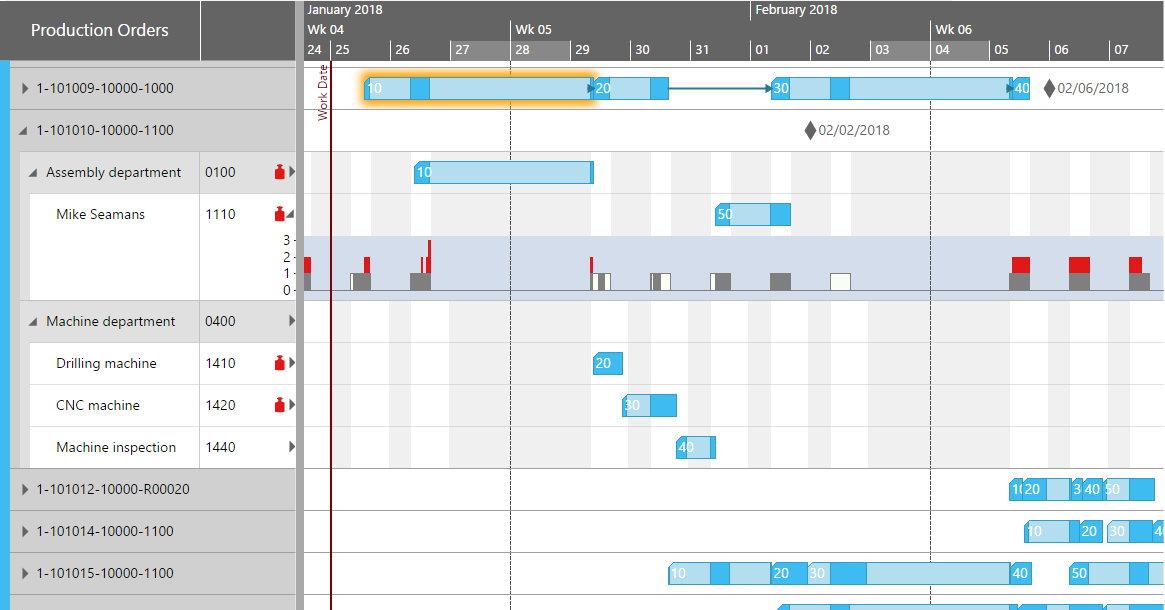
Netronic VSW SE features
VSW SE includes resource timelines, resource histograms, work calendars, and client-side PDF export. The canvas rendering approach is its most distinctive technical characteristic: very large datasets that would slow a DOM-based Gantt remain performant because the browser performs a single canvas repaint rather than recalculating layout for thousands of elements.
Auto-scheduling, critical path calculation, and baseline tracking are not included. Teams that require those capabilities will need to implement or integrate a scheduling engine separately.
Netronic VSW SE pricing
Pricing is quote-based with no published rates. Contact Netronic GmbH for commercial terms.
Pros of Netronic VSW SE
- Canvas rendering is well-suited to very large datasets with thousands of activities
- Framework-agnostic API works in React, Angular, Vue, or vanilla JS without a wrapper package
- Resource histograms and PDF export included
- ESM and TypeScript support added in version 9.0
Cons of Netronic VSW SE
- No auto-scheduling engine or critical path calculation
- No baselines or variance tracking
- Not on the public npm registry, so customer portal distribution adds onboarding friction
- Pricing is not published and requires contacting Netronic GmbH for a quote
Conclusion
The table below summarizes how each component covers the enterprise feature set we defined at the start of this article.
| Feature | Bryntum Gantt | DHTMLX Gantt | Syncfusion Gantt | DayPilot Gantt | Netronic VSW SE |
|---|---|---|---|---|---|
| Auto-scheduling | Yes | Pro only | Yes | No | No |
| Critical path | Yes | Pro only | Yes (injected) | No | No |
| Resource management | Yes | Pro only | Yes (injected) | No | Yes |
| Baselines | Yes | Pro only | Yes | No | No |
| Client-side export | Yes | Add-on ($350) | Yes | No | Yes (PDF) |
| Public npm | Yes | Yes | Yes | No | No |
| Framework support | React, Angular, Vue, LWC | Framework-agnostic | React, Angular, Vue, Blazor | React, Angular, Vue | Framework-agnostic |
| MCP server | Yes (HTTP) | Yes (HTTP) | Yes (stdio) | No | No |
The table below maps common enterprise scenarios to the component that fits best.
| Use case | Recommended component |
|---|---|
| Full enterprise PM with scheduling engine, export, and AI tooling | Bryntum Gantt |
| Free Community License covering all enterprise features | Syncfusion Gantt |
| Canvas rendering for very large datasets | Netronic VSW SE |
| Open-source or GPL-licensed projects | DHTMLX Gantt Standard |
For teams that need the complete enterprise feature set (auto-scheduling, critical path, resource management, baselines, and client-side export), Bryntum Gantt and Syncfusion Gantt are the two clear options. Bryntum's ChronoGraph engine is more mature and the export format coverage is broader, but the per-developer cost is meaningful on large teams. Syncfusion's Community License removes the cost barrier entirely for qualifying organizations, though teams that grow past the eligibility thresholds will need to budget for a commercial quote.
DHTMLX Gantt is the practical choice when the codebase must remain under a GPL-compatible license, and the Standard tier is sufficient if auto-scheduling and critical path are not required. DayPilot suits project tracking interfaces where task dates are managed by the application rather than a scheduling engine. Netronic VSW SE fills a specific niche: when activity counts reach into the tens of thousands and DOM rendering becomes a bottleneck, the canvas-based approach offers a performance path that the other four components cannot match.